Trade pages · Updated May 2026

A landscaping estimate app for contractors who quote from the jobsite.

Landscaping estimates get messy fast: bed size, cleanup scope, mulch depth, plant count, sod area, grading, irrigation notes, haul-away, access, equipment needs, and exclusions. EstimateIn10 helps turn the walkthrough into a professional estimate draft before the details disappear.

Phone-first estimating No credit card trial Built for landscaping contractors

Plain-English disclosure: this page is written for landscaping contractors evaluating EstimateIn10 as an estimating workflow. You still review every scope, price, and line item before sending anything to a client.

Built around the real shape of a landscaping quote.

A good landscaping estimate is more than a quick materials total. It has scope, measurements, crew time, equipment, disposal, access notes, weather assumptions, exclusions, client expectations, and enough detail to prevent confusion later.

Walkthrough notes become scope

Describe what you saw in plain language: yard condition, bed size, material depth, plant count, sod area, grading needs, access, haul-away, irrigation notes, and what the client asked you to include.

  • Mulch, planting, cleanup, edging, trimming, sod, and seasonal refresh jobs.
  • Grading, soil prep, drainage touch-ups, irrigation repair notes, and small hardscape repairs.
  • Haul-away, equipment access, material delivery, and crew-time assumptions.

The draft is not the final answer

EstimateIn10 gives you a structured starting point. You adjust pricing, remove anything that does not apply, add your terms, then send the approval link.

  • Review labor, materials, and margin before sending.
  • Add exclusions like irrigation repairs, drainage fixes, hidden roots, rock removal, plant warranty limits, or weather delays.
  • Keep your existing invoice/payment process after approval.

From landscaping walkthrough to estimate draft

The goal is not to skip judgment. The goal is to stop losing the details between the driveway, the next job, and the kitchen table at night.

Step What the landscaper captures How EstimateIn10 helps
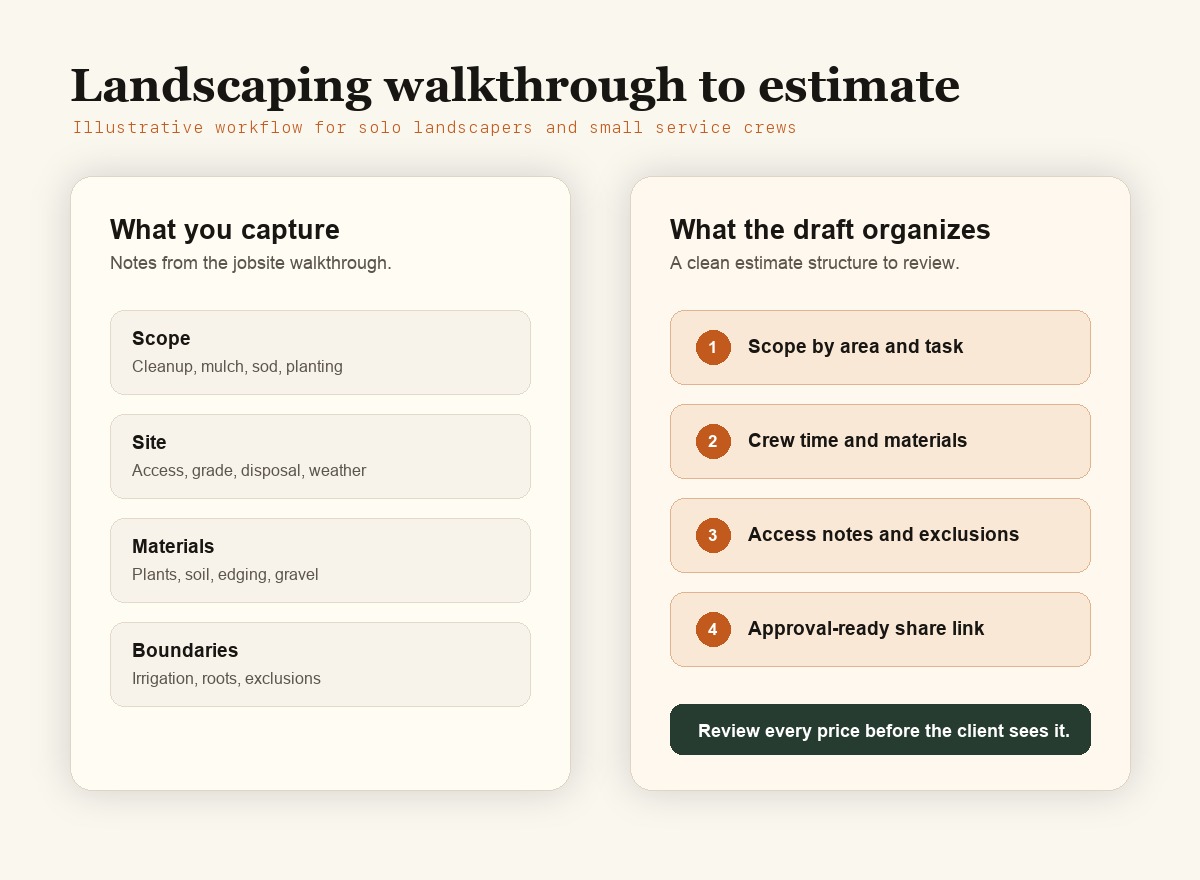
Walkthrough Yard condition, bed size, mulch depth, plant count, sod area, grading needs, irrigation notes, client priorities, and assumptions. Turns messy notes into a structured scope you can edit before sending.
Prep Site protection, equipment access, material delivery, disposal, cleanup, haul-away, weather assumptions, and return trips. Prompts a more complete written scope so small but important steps do not vanish from the quote.
Materials Mulch, soil, sod, plants, edging, gravel, fabric, seed, fertilizer, irrigation parts, and disposal fees. Creates material sections you can price, adjust, or replace with your own numbers.
Client clarity What is included, what is excluded, payment terms, timeline, and approval instructions. Produces a client-ready estimate link instead of a loose text message or spreadsheet.
Review Your final pricing, labor assumptions, material costs, markup, access risk, weather language, and margin. You stay in control. The AI draft is reviewed and adjusted before it reaches the customer.
Best fit Solo landscaping contractors and small service crews who quote from a phone after a walkthrough. Designed for fast first drafts, not full scheduling, dispatch, invoicing, or payroll.
Illustrative workflow for turning a landscaping walkthrough into an EstimateIn10 estimate draft.
Illustrative workflow for a landscaping contractor writing a quote from jobsite notes.

An honest fit check

EstimateIn10 is useful when estimate writing is the bottleneck. It is not trying to replace every system in your landscaping business.

Use it if

You leave walkthroughs with good notes but lose time turning those notes into a professional scope and price breakdown.

Be careful if

Your landscaping estimates depend on large commercial maintenance contracts, detailed landscape architecture plans, or multiple estimator approvals.

Keep using

Your current invoice, payment, calendar, and bookkeeping setup. EstimateIn10 is for getting the estimate out faster.

FAQ

Is EstimateIn10 useful for landscaping estimates?

Yes. It is designed to turn jobsite descriptions into estimate drafts that include scope, line items, and client-facing details you can review and adjust.

Who is this landscaping estimate app best for?

Solo landscaping contractors, owner-operators, and small repair crews whose main pain is turning varied walkthrough notes into a professional estimate quickly.

Can I include cleanup, mulch, planting, sod, grading, irrigation, materials, labor, and exclusions?

Yes. Include those details in the job description, then review the generated estimate and adjust it to match your real plan, access assumptions, weather risk, and local market.

Does it replace my pricing judgment?

No. You still own the pricing, scope, assumptions, and final client promise. EstimateIn10 helps create the draft faster.

Does it work on a phone?

Yes. EstimateIn10 is built for contractors who quote while moving between jobs, not only at a desk.

Can I try it without a credit card?

Yes. Start with a trial and decide whether the estimating workflow fits your actual jobs.

More contractor pages

Compare EstimateIn10 by software category or by trade-specific estimating workflow.

Try it on your next landscaping walkthrough.

Describe the job before you leave the driveway. Review the estimate draft, adjust the numbers, and send a clean client link.

Start free