Quote from the truck
Speak or type the job details from your phone instead of rebuilding the quote at night.
If Jobber is more field-service system than you need right now, use EstimateIn10 to turn jobsite notes into a clean estimate before you leave the driveway.
Plain-English disclosure: Jobber is a well-known field service platform. This page is for contractors deciding whether they need a full operations system or a focused estimating tool. Jobber is not affiliated with EstimateIn10.
You need the estimate sent while the job is still warm.
Speak or type the job details from your phone instead of rebuilding the quote at night.
Use the invoicing, payment, calendar, or bookkeeping tools you already trust.
Give the client a professional approval link while the walkthrough is still fresh.
That distinction matters. A solo contractor does not always need the same software stack as a multi-crew service company.
Jobber is a field service management platform. It can make sense when you need customer records, scheduling, dispatch, invoicing, payments, and team coordination in one system.
EstimateIn10 starts with the estimate itself: describe the job, review the generated scope and pricing, then send a clean approval link from your phone. In FSM Lite, approved work can move into lightweight job, visit, invoice, and payment follow-up.
This comparison is intentionally conservative. Check each vendor's current pricing and feature docs before making a buying decision.
| Feature | Jobber | EstimateIn10 |
|---|---|---|
| Best fit | Service businesses that want one system for operations, customers, scheduling, and billing. | Solo contractors and small crews that want to create estimates quickly from the jobsite. |
| Estimating workflow | Build quotes using customer records, line items, saved templates, and platform workflow. | Describe the job in plain language, review the draft estimate, adjust as needed, and share a link. |
| Scheduling and dispatch | Available as part of the field service management workflow. | Lightweight job and visit follow-through ; not a broad dispatch platform. |
| Invoicing and payments | Available in Jobber's broader platform. | Reviewed invoice and payment follow-up ; contractors still verify setup before live customer billing. |
| Setup burden | May involve templates, customer records, integrations, and operating processes. | Designed for quick first-use: open it on your phone and write the next estimate. |
| Pricing model | Multiple plans. Check Jobber's current pricing. | Published monthly pricing is listed on EstimateIn10. Limited founding offers may change. |
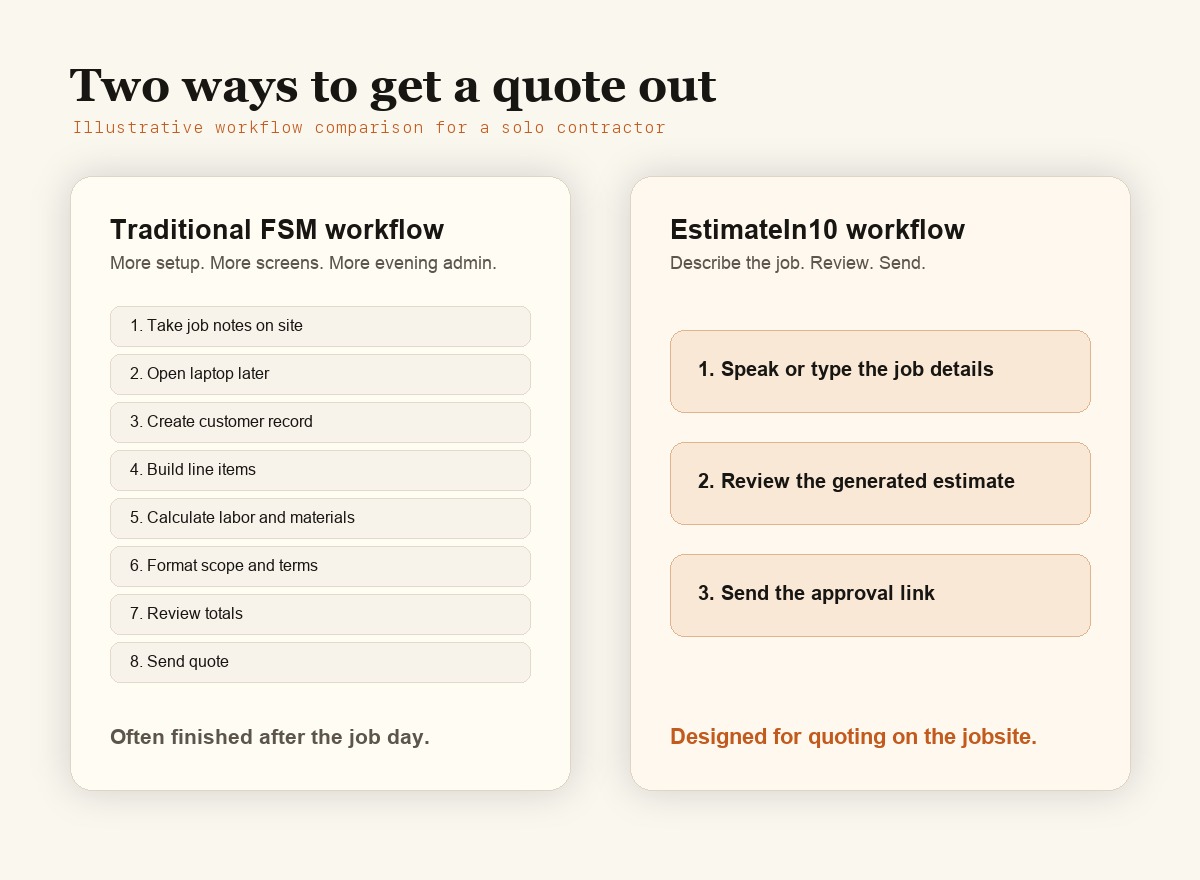
The point is not that one tool is universally better. The point is matching the tool to the job you actually need done.
You need scheduling, dispatch, invoicing, payment collection, recurring services, customer history, or multiple people working from the same operating system.
You mainly need to turn a walkthrough into a clean estimate quickly, then carry approved work forward without buying a full operating system first.
You are unsure. Keep your current workflow intact and use EstimateIn10 only for a few new estimates. The fit should become clear fast.
No. Jobber is a broader field service management platform. EstimateIn10 is estimate-first with lightweight FSM Lite follow-through. That narrower scope is the point.
Solo contractors, owner-operators, and small service businesses whose main pain is writing and sending estimates fast.
FSM Lite can move approved estimates into lightweight jobs, visits, reviewed invoices, and payment follow-up. If scheduling and dispatch are central to your business, compare full field service platforms carefully.
Yes. You can keep estimating in EstimateIn10 and use your current invoice/payment process. FSM Lite follow-through is useful when you want the approved estimate to carry forward inside EstimateIn10.
Yes. EstimateIn10 is built for contractors who quote while moving between jobs, not only at a desk.
Yes. Start with a trial and decide whether the estimating workflow fits your actual jobs.
Choosing software gets easier when you match the tool to the kind of friction you actually have.
For contractors deciding between a full operations platform and a focused estimating tool.
Estimating app Joist alternative for solo contractorsFor contractors deciding between saved templates and AI-assisted estimate drafts.
Trade workflow Painting estimate appFor painters turning walkthrough notes into professional client estimates.
Trade workflow Handyman estimate appFor handymen turning mixed repair notes into professional client estimates.
Trade workflow HVAC estimate appFor HVAC contractors turning equipment and service notes into professional client estimates.
Trade workflow Roofing estimate appFor roofing contractors turning inspection notes into professional client estimates.
Trade workflow Plumbing estimate appFor plumbers turning repair and fixture notes into professional client estimates.
Trade workflow Electrical estimate appFor electricians turning circuit and fixture notes into professional client estimates.
Trade workflow Landscaping estimate appFor landscapers turning yard walkthrough notes into professional client estimates.
Trade workflow Flooring estimate appFor flooring contractors turning room measurements into professional client estimates.
Trade workflow Drywall estimate appFor drywall contractors turning repair notes into professional client estimates.
No heavy setup. No new operations platform to adopt. Write one estimate from your phone and decide whether the speed is worth keeping.
Start free